Book · Pick Up · Play · Return

How the Smart Tennis Hub Works

Reserve a tennis ball machine at a Smart Tennis Hub at or near your court up to 14 days ahead, or walk up and scan the QR on the hub. Collect everything with a six-digit code and bring it back the same way, at any hour, with no staff, no keys and no app to install to book.

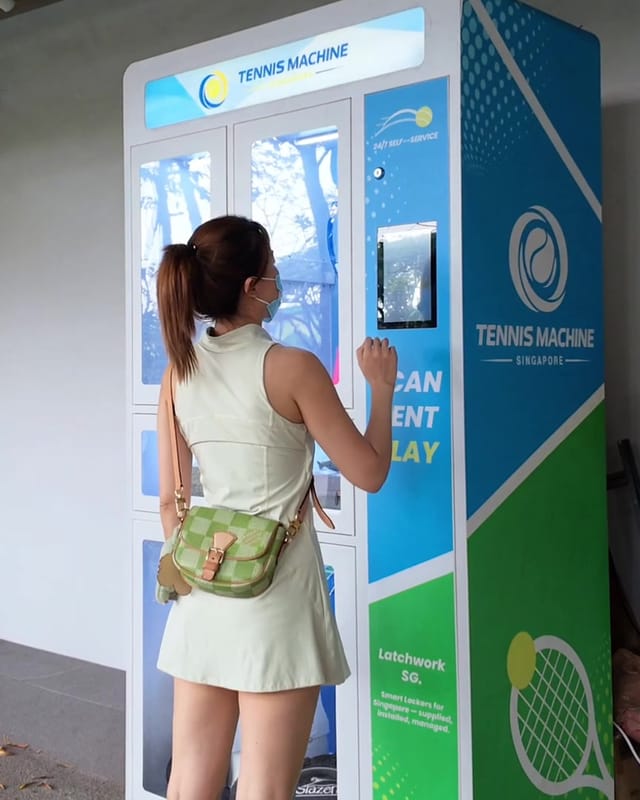
Player tapping Pick up on the touchscreen of a Tennis Machine SG Smart Tennis Hub

Book in Advance, Step by Step

Reserve your machine up to 14 days ahead so it is waiting in the hub when you arrive — here is exactly what happens from start to finish.

  1. 1

    Pick the machine location & slot

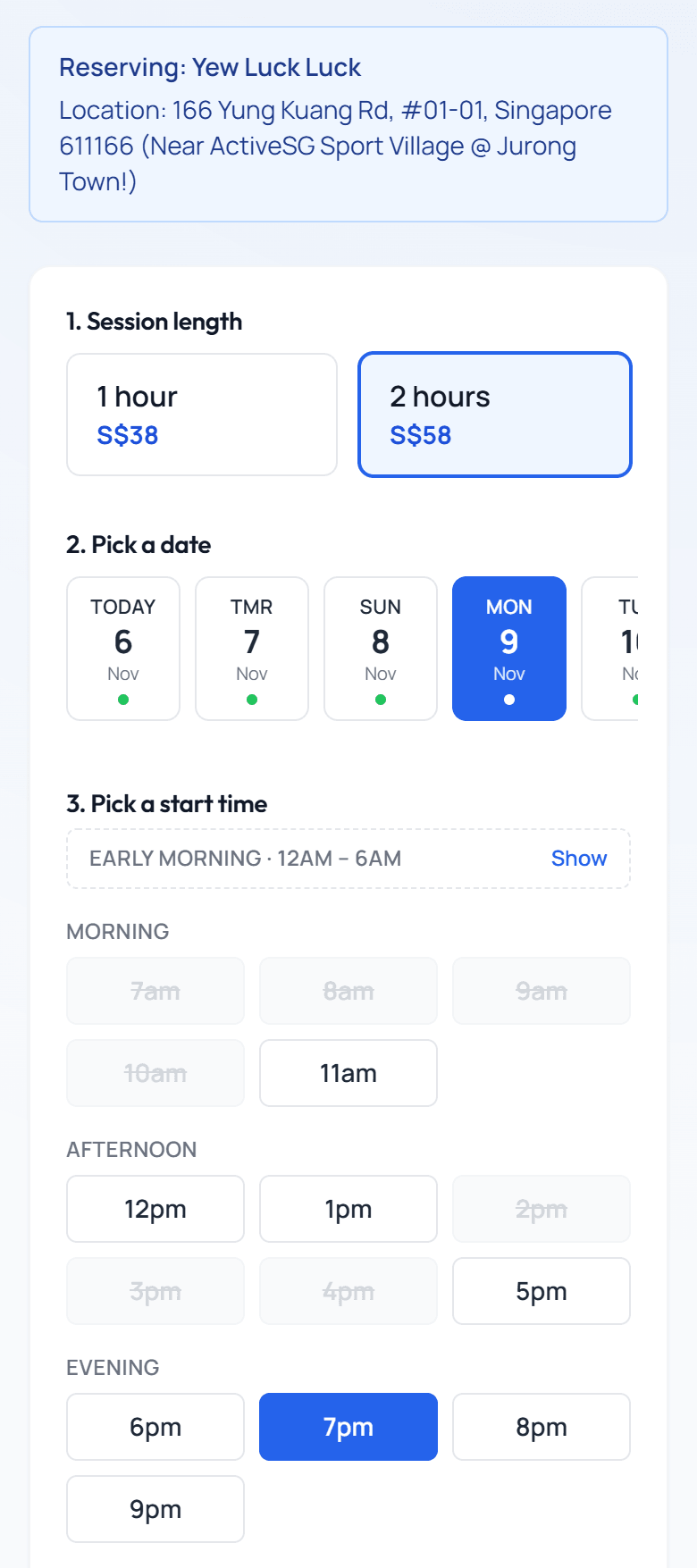
    Open booking.tennismachine.com.sg in your browser and sign in. Choose 1 hour ($38) or 2 hours ($58), then a date up to 14 days ahead and a start time — slots run around the clock. This reserves the machine only, so book your tennis court for the same time separately.

  2. 2

    Pay the rental fee — that's all for now

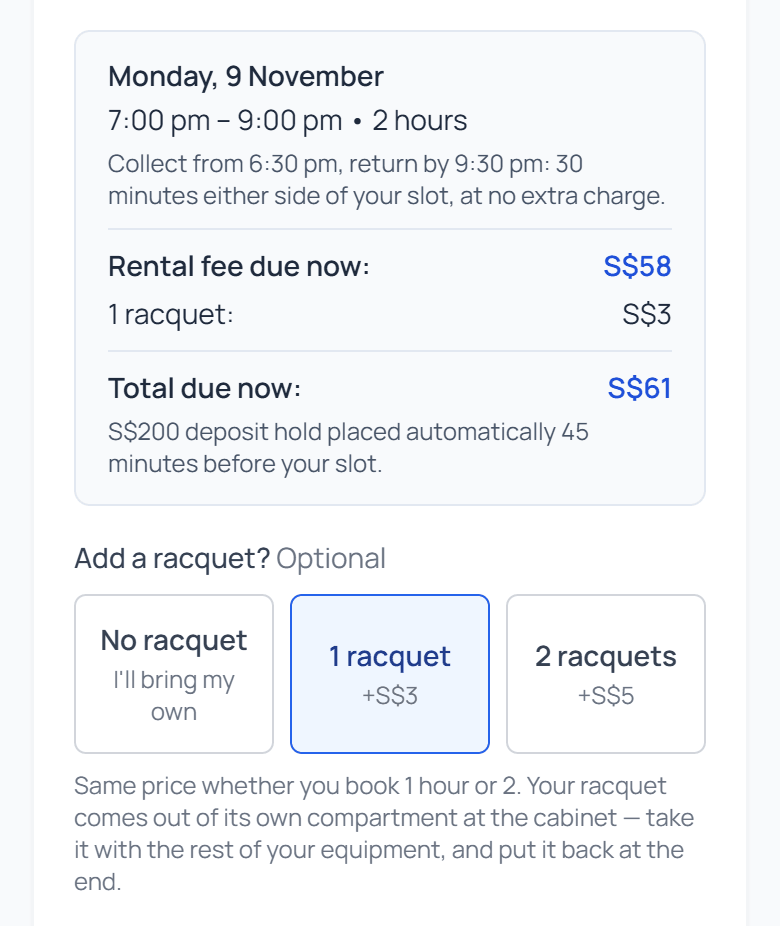
    Pay securely online when you book; payments are handled by Stripe, the world's leading payment processor. Need a racquet? Add one for S$3 or two for S$5. The refundable S$200 deposit hold is placed automatically 45 minutes before your slot.

  3. 3

    Get your six-digit pickup code

    Your code appears in My Bookings as soon as you have paid. You will use it to pick up and to return, so save it somewhere too.

  4. 4

    Pick up at the hub

    From 30 minutes before your start time, tap Pick up on the hub's screen and enter your code. Your compartments open by themselves: take the battery, ball machine, ball bag, cart, picker and any racquets, and close each door. That half-hour is there so you can collect everything and walk to your court before your slot begins.

  5. 5

    Play

    Wheel everything to your court, connect the battery to the machine, and start it from its free phone app. A full battery gives about 4 hours of play, so it will outlast your session.

  6. 6

    Return & go

    You get the same 30 minutes at the end of your session: everything needs to be back within 30 minutes of your end time, with nothing extra to pay. Tap Return, enter the same code, and put each item back. The hub ticks each one off and closes your session by itself, and your deposit hold is released within 24 hours.

Tennis Machine SG Book in Advance page with a 2-hour session at S$58, a date and a 7pm start time selected

Pick Up and Return: Under a Minute Each

Both guides were filmed at the hub, and they also play on its screen, so you can watch again when you get there.

How to pick up 52 sec

What the video shows

  1. Tap "Pick Up" on the screen.
  2. Check your booking on your phone and enter your pickup code.
  3. The locker opens automatically.
  4. Disconnect the thinner power cable, then remove the battery. The thicker cable connects to the tennis ball machine.
  5. If you also booked racquets, take out your racquet gear gently.
  6. Take out the ball machine, bag, cart and retriever. The machine is quite heavy.
  7. Make sure all doors are closed before you leave, and enjoy your practice.
How to return 47 sec

What the video shows

  1. Tap Return on the screen. The hub asks for the same six-digit pickup code, then the doors open automatically.
  2. Return the battery to its spot and remember to plug it in.
  3. Return the ball bag, ball cart and retriever to their spots.
  4. Return the tennis machine to its spot. Be careful, it is quite heavy.
  5. Return the racquets to their spot and close all the locker doors.

The video goes straight from the screen to the open door, but the hub asks for your pickup code first. It is the same code you picked up with.

Three Things First-Timers Miss

Swipe to see more →

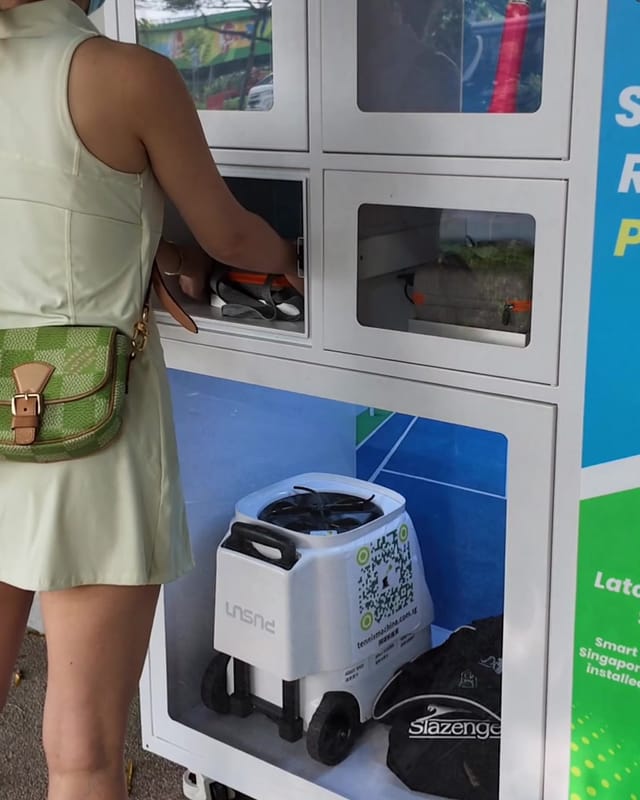
Player taking the battery pack out of its small compartment at a Smart Tennis Hub

Take the battery with you

It has its own small compartment, apart from the machine. Unplug the thinner charger cable, then lift it out. The thicker cable is the one that connects to the machine.

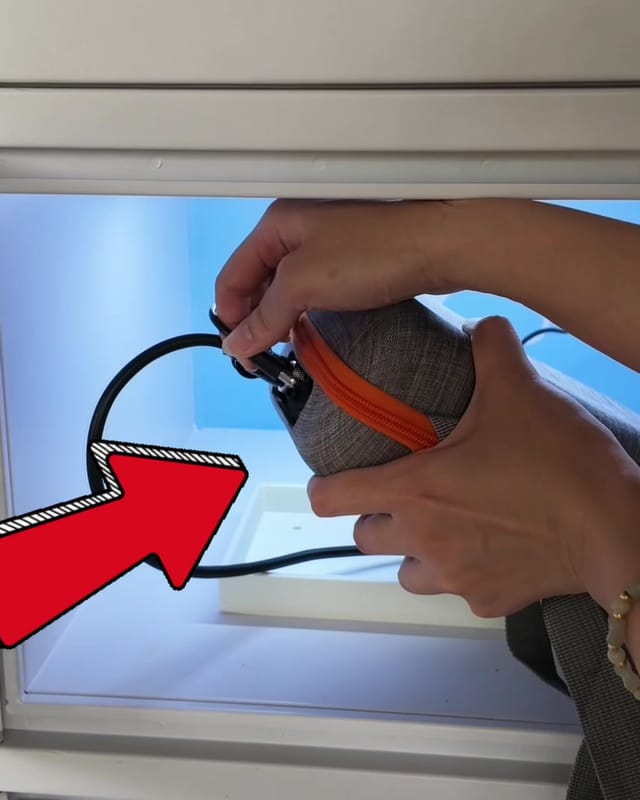
Hands plugging the charger cable back into the battery pack in its compartment, with an arrow pointing to the plug

Plug the battery back in

On the way back, put the pack in its compartment and plug the charger cable in. The hub only ticks the battery off once it sees it charging.

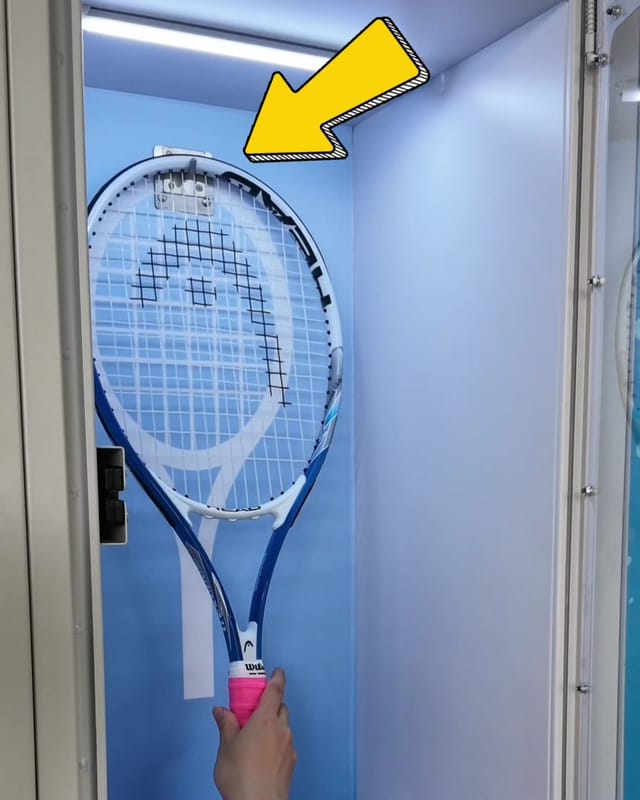
Hand placing a racquet back in its compartment, with an arrow pointing to the hook at the top

Close every door

Your return finishes once everything is back and every door is shut, so check you have your own things first. Racquets hang back on their hook.

A closer look at your booking

Your pickup code, always at hand

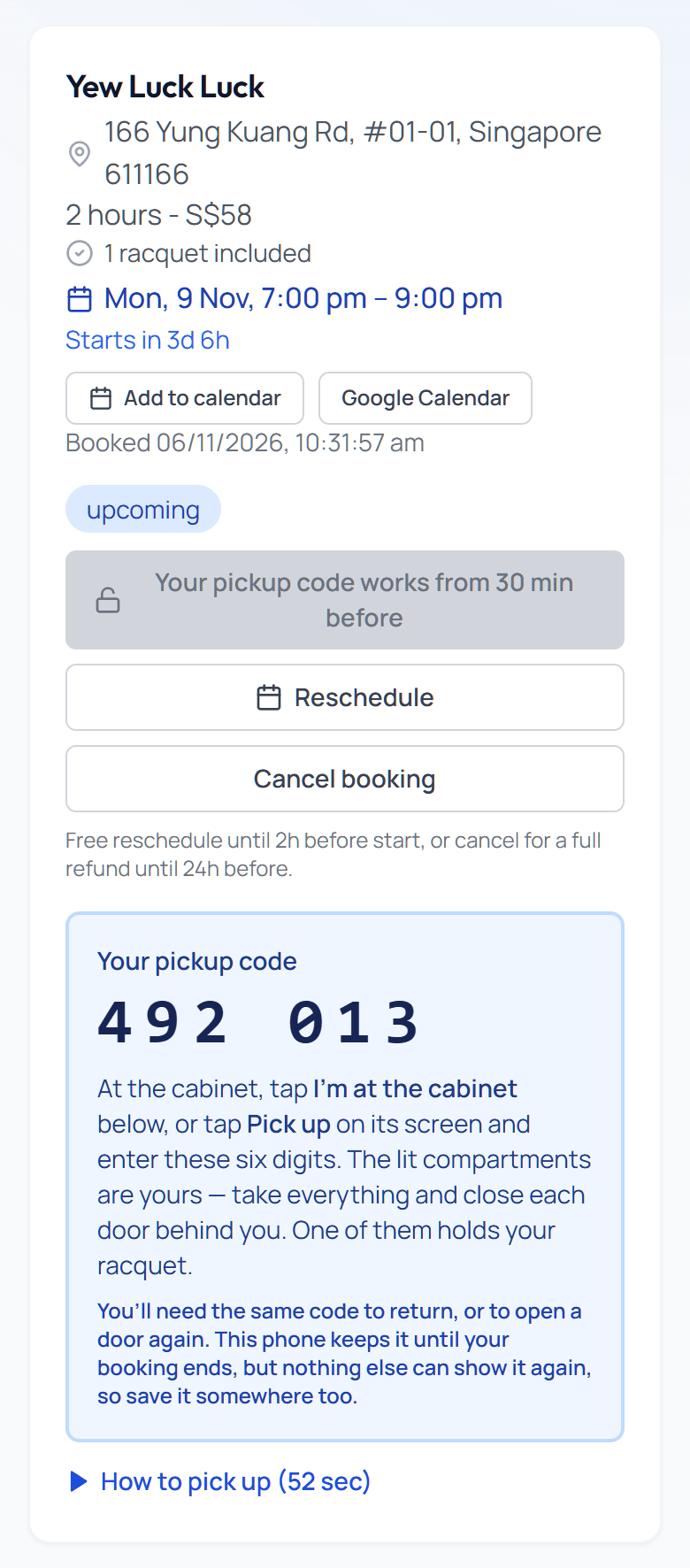
Every booking has its own card in My Bookings with your machine location, time slot and a countdown — nothing to print and no app to install.

  • ✓Your six-digit code works from 30 minutes before your start time
  • ✓Standing at the hub? Tap "I'm at the cabinet" and skip typing it
  • ✓Plans changed? Move your slot free until 2 hours before, up to 3 times
  • ✓Cancel for a full refund up to 24 hours before your slot
Tennis Machine SG My Bookings card showing an upcoming reservation, a six-digit pickup code, and reschedule and cancel buttons

Wrap up at the hub

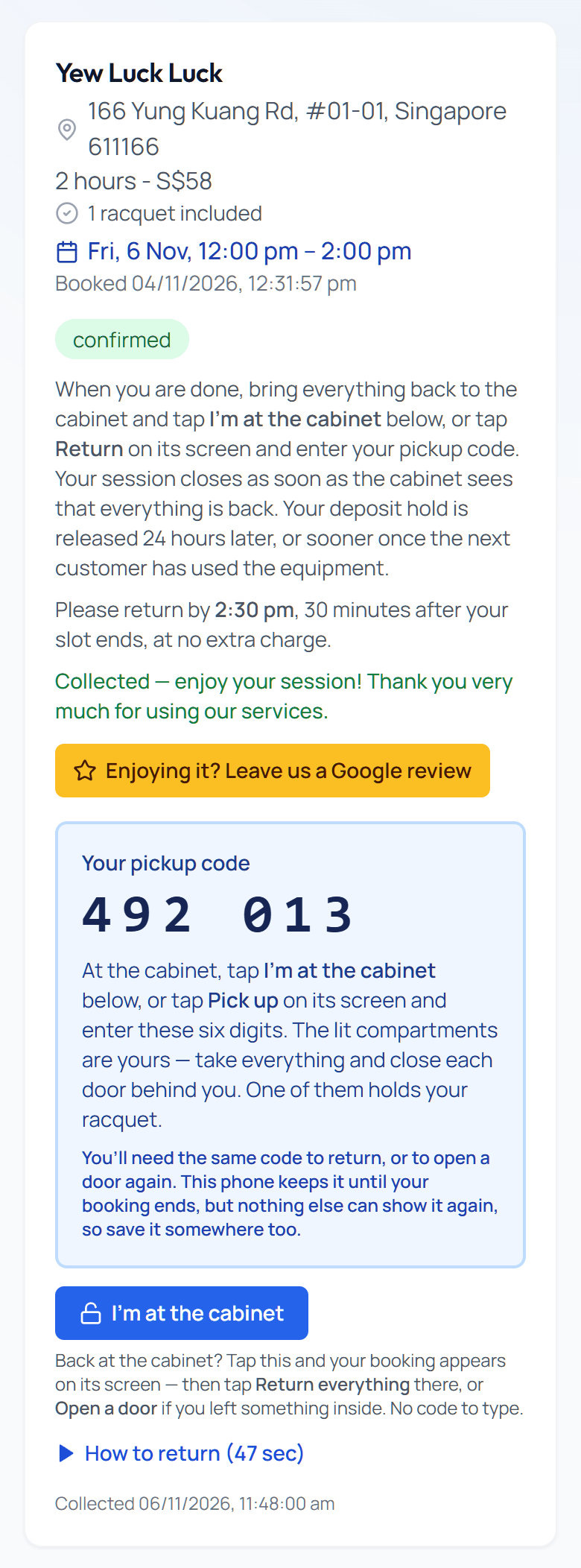
During your session the same card tells you when everything is due back — and there is no button to remember, because the hub sees it come back.

  • ✓Left something inside? "Forgot something?" on the screen opens the door again
  • ✓Return within 30 minutes of your end time — the same grace you get before the start
  • ✓Your session closes by itself once the hub sees everything back
  • ✓Your S$200 deposit hold is released 24 hours later, or sooner once the next customer has used the equipment
Tennis Machine SG My Bookings card during a session, showing when to return, the pickup code and the I'm at the cabinet button

Please note: the court booking is not included

You are renting the ball machine, battery, balls, cart and picker — the tennis court itself is booked and paid for separately with whoever runs it. Public courts go through the ActiveSG app; condominium, club and academy courts are booked with your own management or club. Book your court first, then reserve a machine slot to match.

Where to play in Singapore: court guide →

First time with a ball machine? Read this before your session

The machine runs from a free phone app, so download it before you arrive. Our operating guide covers connecting it, safe starting settings for your level, drills and on-court safety, plus the full manufacturer manual to download.

Read the machine guide & download the manual →

Three Ways to Rent

Book in Advance

Reserve your slot up to 14 days ahead so the machine is guaranteed to be waiting when you arrive.

  • ✓Slots around the clock, up to 14 days out
  • ✓Pay only the rental fee at booking
  • ✓Collect from 30 minutes before your slot, return up to 30 minutes after it
  • ✓Move it free until 2 hours before, or cancel for a full refund up to 24 hours before

On the Spot

Already at the hub? Touch its screen, choose Instant unlock and scan the QR code to pay on your phone.

  • ✓No booking needed — walk up any time the machine is free
  • ✓Pay the rental fee and authorise the deposit hold, then collect right away
  • ✓Same prices and gear as booking ahead

Day or Week

Keep the machine for $78 a day or $198 a week. WhatsApp us and we'll arrange it.

  • ✓We send your pickup code on WhatsApp, so there is no account to create
  • ✓Collect and return at the hub like any booking
  • ✓A charger comes with it: a full battery gives about 4 hours of play
  • ✓Rental fee and refundable deposit settled directly with us

Online bookings cost $38 for 1 hour or $58 for 2 hours. Every rental includes a charged battery, 130+ balls, a transport cart and a ball picker. Your tennis court booking is not included — reserve the court separately with the venue. See full pricing.

Tennis Machine Rental FAQ

What is the Smart Tennis Hub?

The Smart Tennis Hub is Tennis Machine SG's 24/7 self-service smart locker for tennis: a cabinet at or near the courts with a touchscreen and five compartments, holding a professional ball machine, charged batteries, 130+ balls, a transport cart, a ball picker and optional racquets. You book online, collect everything with a six-digit pickup code, and the hub's sensors check the machine, battery, ball bag and racquets back in when you return them. There are no staff, no keys and no app to install to book.
What is a tennis ball machine?

A tennis ball machine (also called tennis machine or ball machine) feeds balls at adjustable speed, spin, and interval so you can practice consistently without a partner.

How do I rent a tennis machine?

Book online at booking.tennismachine.com.sg: pick the machine location, choose 1 or 2 hours, and reserve a slot up to 14 days ahead. Already at a Smart Tennis Hub? Touch its screen, choose Instant unlock, scan the QR code and pay on your phone. Either way your six-digit pickup code appears in My Bookings. For daily or weekly rentals, message us on WhatsApp and we will arrange it.

How do I pick up the machine at the Smart Tennis Hub?

From 30 minutes before your slot, tap Pick up on the hub's screen and enter your six-digit pickup code, or tap I'm at the cabinet in My Bookings and then Open the doors on the screen. Your compartments open by themselves. Unplug the thinner charger cable and take out the battery, then take the ball machine, ball bag, cart, picker and any racquets you booked, and close every door behind you.

How do I return the machine?

Within 30 minutes of your end time, at no extra charge, tap Return on the hub's screen and enter the same pickup code, or tap I'm at the cabinet in My Bookings. Put the battery back and plug its charger cable in, put the machine on the left of the large compartment and the ball bag on the right, return the cart, picker and any racquets, and close every door. The screen ticks each item off as the hub sees it, and your session closes by itself.

Is the tennis court booking included in the machine rental?

No. The rental fee covers the ball machine, battery, 130+ balls, transport cart and ball picker only — the court is booked and paid for separately with whoever runs it. Public courts are booked through the ActiveSG app, while condominium, club and academy courts are booked with your own management or club. Please have a court secured for your slot before you collect the machine.

Can I book a tennis ball machine in advance?

Yes. You can reserve a machine at a Smart Tennis Hub up to 14 days ahead — pick the machine location, session length, date and start time, with slots starting on the hour around the clock. You pay only the rental fee when you book; the refundable S$200 security deposit hold is placed automatically 45 minutes before your slot. You can collect from 30 minutes before your start time, and the same 30-minute grace applies at the other end: the equipment simply needs to be back in the hub within 30 minutes of your end time, at no extra charge.

Can I reschedule or cancel a booking?

Yes. Moving an advance booking is free up to 2 hours before its start time, up to 3 times. Cancelling gives a full refund up to 24 hours before the start time, or within 15 minutes of booking if the slot is at least 2 hours away. Other cancellations are non-refundable, including a booking that has been moved within 24 hours of its start time.

Is there any upfront payment for tennis ball machine rental?

For rentals booked online you pay only the rental fee when you book — $38 for 1 hour or $58 for 2 hours, plus any racquets. A refundable S$200 security deposit hold is then placed on your card before your session. Daily and weekly rentals are arranged via WhatsApp.

Is there a deposit?

Yes. Bookings made online include a refundable S$200 security deposit hold on your card to cover the equipment while it is in your care. It is a hold, not a charge. For an advance booking it is placed automatically 45 minutes before your slot, or at checkout if your slot starts sooner or you book on the spot. Please make sure your card has S$200 available at that point: if the hold does not go through, the hub will not open until you confirm it with this or another card in My Bookings. The hold is released 24 hours after you return everything, or sooner once the next customer has used the equipment, and typically clears within 7 business days depending on your bank.

Can I rent a racquet as well?

Yes, at a Smart Tennis Hub. Add a racquet when you book: S$3 for one or S$5 for two, the same price for a 1-hour or a 2-hour session. It comes out of its own compartment with the rest of your equipment and goes back at the end. If you leave a racquet you paid for in its compartment, the fee for it is refunded automatically.

What if I lose my pickup code?

My Bookings keeps your code on the phone it was first shown on until your booking ends, but nothing else can show it again, so save it somewhere too. If you lose it, tap Lost it? Get a new pickup code in My Bookings; the old code stops working straight away. Standing at the hub, you can also skip typing altogether by tapping I'm at the cabinet in My Bookings.

What if I leave something behind, or the hub does not tick an item?

During your session, tap Forgot something? on the hub's screen and enter your code to open any of your compartments again. If you have put everything back and an item still will not tick, you can report the return on the screen once every door is shut; we check our camera before closing your booking. For any other problem, WhatsApp us on +65 8575 3796.

What happens if it rains?

Do not start or continue a session in the rain or on a wet court, because wet balls jam the machine. If rain starts during your session, stop the machine and return everything to the hub. Rain within the first 15 minutes gets a full refund of the rental fee; after that, unused time is refunded pro rata in 30-minute blocks. WhatsApp +65 8575 3796 with a photo and timestamp on the day of your rental.

Where are the Smart Tennis Hubs located?

We are building a network of 24/7 Smart Tennis Hubs across Singapore. The first is in Jurong, at Yew Luck Luck Convenience Store, 166 Yung Kuang Road, #01-01, Singapore 611166, a short walk from the courts at ActiveSG Sport Village @ Jurong Town, and more are on the way. See the Locations page for the current list and map.

I have never used a tennis ball machine before — is it hard to operate?

No. The machine runs from a free phone app, so download it before you arrive, and the controls come down to four things: speed, spin, feed rate and direction, with a gentle beginner mode to start on. Our step-by-step machine guide covers connecting the app, safe beginner settings and drills, and you can download the full manual from the same page. Stuck on court? Message us on WhatsApp.

Still have a question? Our team is happy to help — message us on WhatsApp.

Ready to play?

Book online in seconds, or message us if you have any questions.

Book Online